
Key facts
- Huntress published a blog post on 2026-11-25 describing three attacks that achieve full Microsoft 365 compromise without any software exploit.
- In the first chain, an employee runs malicious PowerShell on their own computer after clicking a phishing link, giving the attacker inbox access in about eight minutes with no malware installed.
- Multi-factor authentication blocks the attacker's first attempt using the stolen password in the ClickFix chain.
- The ClickFix phishing email uses ChatGPT-drafted language, such as a note on a holiday policy, with a deadline and link to a look-alike SharePoint site.
Huntress published a blog post on Nov. 25 describing three attacks that take full control of Microsoft 365 accounts without exploiting any software vulnerability.
The three chains share one trait: every attack asks the user for a single ordinary action, and each victim behaves as a reasonable employee would on a busy day. None of the chains requires a software vulnerability, and in one of them the attacker never sees the user’s password.
The first, ClickFix, begins with a stolen login purchased off the dark web for roughly the price of a large pizza, and the attacker’s first attempt with the stolen password is stopped by multifactor authentication. The phishing e-mail then arrives with language drafted by ChatGPT, a note on a holiday policy with a deadline and a link to a look-alike SharePoint site. The page shows a prove-you-are-not-a-robot box that, when clicked, loads a payload onto the clipboard and tells the employee to open the Run dialog, paste, and press Enter.
Believing they are completing verification, the employee runs the attacker’s PowerShell on their own machine, and no malware is installed. The PowerShell sends the employee’s session cookies to the attacker, cookies the browser stored because the employee chose to stay signed in. The attacker loads the stolen cookies into the free Cookie Editor extension, refreshes, and opens the employee’s Outlook inbox, gaining access in about eight minutes from the initial click. The stolen session cookie carries the approved multifactor authentication, so the attacker never needs the victim’s phone, and this token impersonation, also called session hijacking, reaches beyond Microsoft 365 because everything the browser held becomes available.
The second chain turns a standard user’s stolen login into a Global Admin account within six minutes. The attacker routes the victim through an Evilginx proxy between the user and the Microsoft login page, captures the credentials, and signs in as the victim. Because the victim had not set up multifactor authentication, the attacker registers their own method, so a password reset does not lock them out; the victim cannot reach the admin center, but the attacker can still reach the Azure management portal and Entra.
The attacker finds that the victim owns a finance integration app registration carrying a directory-wide role management permission, unusual for a standard user, and creates a new app secret with a two-year lifespan, preserving access even if the victim’s account is blocked. Using n8n, a workflow automation tool, the attacker describes the desired Global Admin change in plain English, and the workflow runs after a few minutes of back and forth. The victim then logs back in using the attacker’s multifactor authentication and opens the admin center as a Global Admin. Roughly seven controls could have halted or slowed the chain by blocking standard users from the admin center and requiring multifactor authentication registration.
The third chain is EvilTokens, a phishing-as-a-service platform that Huntress and Microsoft tracked as it hit over 300 organizations in roughly two weeks, and it captures no passwords at all. An attacker enters a company’s domain into EvilTokens, and the platform generates a phishing e-mail targeting that company’s employees. The message contains a short sign-in code similar to a Netflix code; the employee goes to Microsoft’s real login page and signs in with it, using their own credentials and multifactor authentication. Because the code is tied to the attacker’s session, the employee’s sign-in sends access to the attacker’s back end, and the real Microsoft page hands the account to the attacker.
The attacker then gets the employee’s e-mail and all OneDrive documents and can search through them, while the employee sees a normal sign-in, returns to work, and someone else reads their files. Access can persist after a password reset unless the attacker’s session and tokens are revoked, and EvilTokens lasted from its launch until its takedown in fewer than nine months.
A beginner who replays a stolen session token lands in an active session where sign-in and multifactor authentication are finished, gaining immediate access to cloud resources and email. A completed multifactor authentication step does not by itself make a session trustworthy, and stolen tokens are more valuable to attackers than passwords because they can be replayed into an active session for cloud resources and email. In device code phishing, the victim authenticates directly with the identity provider while the attacker collects the resulting authorization, making it feel like a normal sign-in. Adversary-in-the-middle attacks relay the authentication flow in real time through a fake login page or by intercepting an exchange inside the legitimate app while the victim completes multifactor authentication.
Huntress researchers examined several advanced phishing kits aimed at Microsoft 365 tokens, including EvilTokens, Knight Office, and Kali365. Knight Office, an adversary-in-the-middle phishing kit, captures valid Microsoft 365 session tokens and sends them to an operator console for replay and persistence across tenants. Kali365 packages a complete phishing-as-a-service operation in one control panel, so operators can harvest tokens using device code flows and proxy lures, replay them into active Microsoft 365 sessions, keep access, and expand activity with built-in AI features.
EvilTokens was found in early 2026 during a device-code phishing campaign that abused Railway Platform-as-a-Service, and a joint effort by Microsoft’s Digital Crimes Unit and the FBI later in 2026 led to the arrest of one alleged EvilTokens operator. Microsoft’s Principal Corporate Counsel Carlton Gammons, Huntress’s Chief Legal Officer Lauren Zajac, and Product Manager Rich Mozeleski explain how Huntress’s early research and a law written for the mob took EvilTokens down.
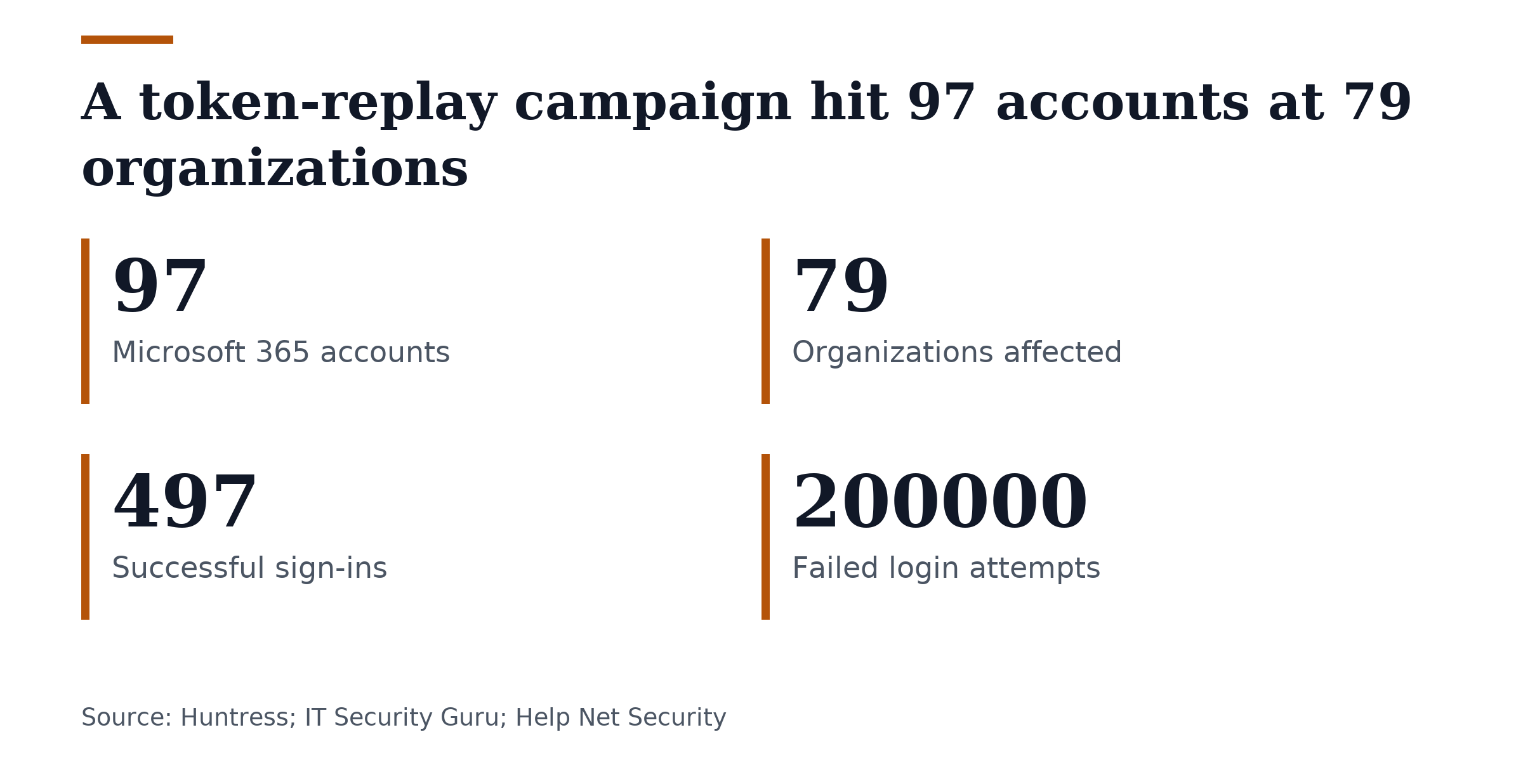
Huntress followed a token-replay campaign that ran from July 14 to Sept. 22, involving 97 Microsoft 365 accounts at 79 organizations over roughly 10 weeks, with 497 successful sign-ins and over 200,000 failed login attempts recorded. Attackers used adversary-in-the-middle phishing to capture session tokens after victims completed multifactor authentication, then replayed those tokens to access accounts without a password or further multifactor authentication prompt, and they placed hidden inbox rules that stopped victims from seeing parts of their own mail.
The attackers replayed stolen sessions from 1337 Services GmbH servers in Hamburg, Germany, while Microsoft Entra ID Protection separately identified several of those addresses. People arrived at fake sign-in pages supported by adversary-in-the-middle relays that forwarded the real Microsoft login page and multifactor authentication prompt while retaining the session token Microsoft issues after sign-in completes; because the token is created after multifactor authentication, anyone who holds it can use it without another multifactor authentication check. Some tokens came from device-code phishing that tricked victims into typing a code on Microsoft’s legitimate sign-in page; others resulted from social engineering during normal login.
The attacker replayed stolen tokens in large volumes, primarily from a single block of IP addresses, a pattern researchers call token spraying, which they describe as password spraying’s pattern except stolen tokens replace guessed passwords. Six addresses from the 193.26.115.0/24 range were used in four phases, with week- or two-week breaks between some, and blocking one address halted only one phase.

A hijacked session from a 1337 Services address appeared 12 minutes after the multifactor authentication prompt on July 21, and on Sept. 22 the interval was four minutes. On Sept. 11, the attacker switched addresses and used an automated tool reusing captured tokens, and in four days hundreds of sign-ins hit nearly 30 organizations. That address was blocked 1,052 times, with all the blocks coming from four organizations whose Conditional Access policies rejected the sign-ins.
Conditional Access policies can demand multifactor authentication or block access outright, and Huntress says they can close some security gaps that multifactor authentication cannot. After gaining access, the attackers added rogue devices and authenticator apps, then created inbox rules to conceal their activity. Huntress identified at least 48 rogue computers in Microsoft Entra victim directories, each carrying the name DESKTOP- plus eight hexadecimal characters, and a registered device remains in the directory until someone deletes it.
In 19 organizations, the victim’s current authentication methods were removed and a replacement was added within three hours of the first sign-in from a campaign address. On July 21, an iPhone 13 authenticator app was activated under an hour after hijacking, and access survives a password reset unless the app is audited and removed. Rules named dot, sss and iT deleted incoming mail, marked it as read, or moved it to folders such as RSS Feeds and Conversation History. In one incident, a hijacked mailbox sent a payroll-related message to an outside accountant.
The attacker changed one rule so it caught messages mentioning bank, bonus, direct deposit or payroll; five minutes later a second rule hid all mail from that accountant.
Huntress issued a blog post with mitigation guidance and indicators of compromise to help Microsoft 365 administrators detect and block similar intrusions. “The Microsoft accounts were compromised without the attacker ever needing a password,” researchers noted.
Defenders spot stolen sessions through checks of unfamiliar cloud infrastructure, device code authentication, automated token refresh, mailbox activity, new devices, and authentication methods for sign-ins. Huntress said that in a two-week span, 85 percent of Defender incidents rated medium and high severity lacked device-related evidence, so endpoint-centric tooling would have missed them.
Huntress expanded its Agentic Security Platform so its 24/7 security operations center can investigate and respond to incidents across the wider Microsoft Defender suite, not only Defender for Endpoint and Defender Antivirus. The expansion came after the token-replay campaign from July 14 to Sept. 22, and Huntress noted that the Adversary Infrastructure capability in Managed ITDR turns one organization’s incident into a same-day Conditional Access block for eligible, opted-in Entra ID P1 tenants.
The company advises administrators to review their tenant to see which users own app registrations and which applications carry directory-wide permissions, since each setting could have been disabled, and to pick one control and check it in their own tenant if they can do only one thing. A web page telling someone to open the Run dialog is a ClickFix warning sign because no real CAPTCHA asks for that, and a login code the user never requested deserves the same suspicion as an unexpected password prompt.
Containment must cover identity artifacts, not just the lure: revoke refresh tokens, remove devices and Windows Hello credentials, restrict device code authentication, and review mailbox rules and phishing. Defenders should watch for replay or re-entry and continue hunting after the original phishing domain vanishes.
Join the discussion